
Checkout Recovery for Gravity Forms
Stop losing sales to abandoned forms.
A shopper picks a product, types their email and leaves before paying. Checkout Recovery saves that order, emails them a link that puts every answer back in the form, and shows you in dollars what came back.
Unlimited sites. Works with Gravity Forms payment add-ons such as Stripe, PayPal Checkout and Square.
Screenshots
See it in your WordPress dashboard.
Real screens from the plugin, filled with sample data from a sample store. Click any image to see it full size.
The problem
Gravity Forms forgets a checkout the moment the shopper leaves.
Out of the box, nothing is saved until the shopper presses Submit. Someone who stops to find their card, takes a phone call or wants to think it over leaves no name, no email and no order behind. You never learn they were there.
Checkout Recovery keeps the order the moment an email is typed, so you can follow up with the people who were one click away.
How it works
From a half-filled form to money in your account.
-
Saves as they type
Once a valid email is in the form, the checkout is saved with its products, options, quantities and total. It keeps up as the shopper changes things.
-
Notices when they stop
After 15 minutes with no activity, the checkout moves to Abandoned. Payments are matched to the checkout, so anyone who pays never gets a reminder.
-
Sends up to three emails
By default 15 minutes, 24 hours and 72 hours after the shopper’s last activity, each with a Finish my order button. Change any delay, subject or message.
-
Counts what came back
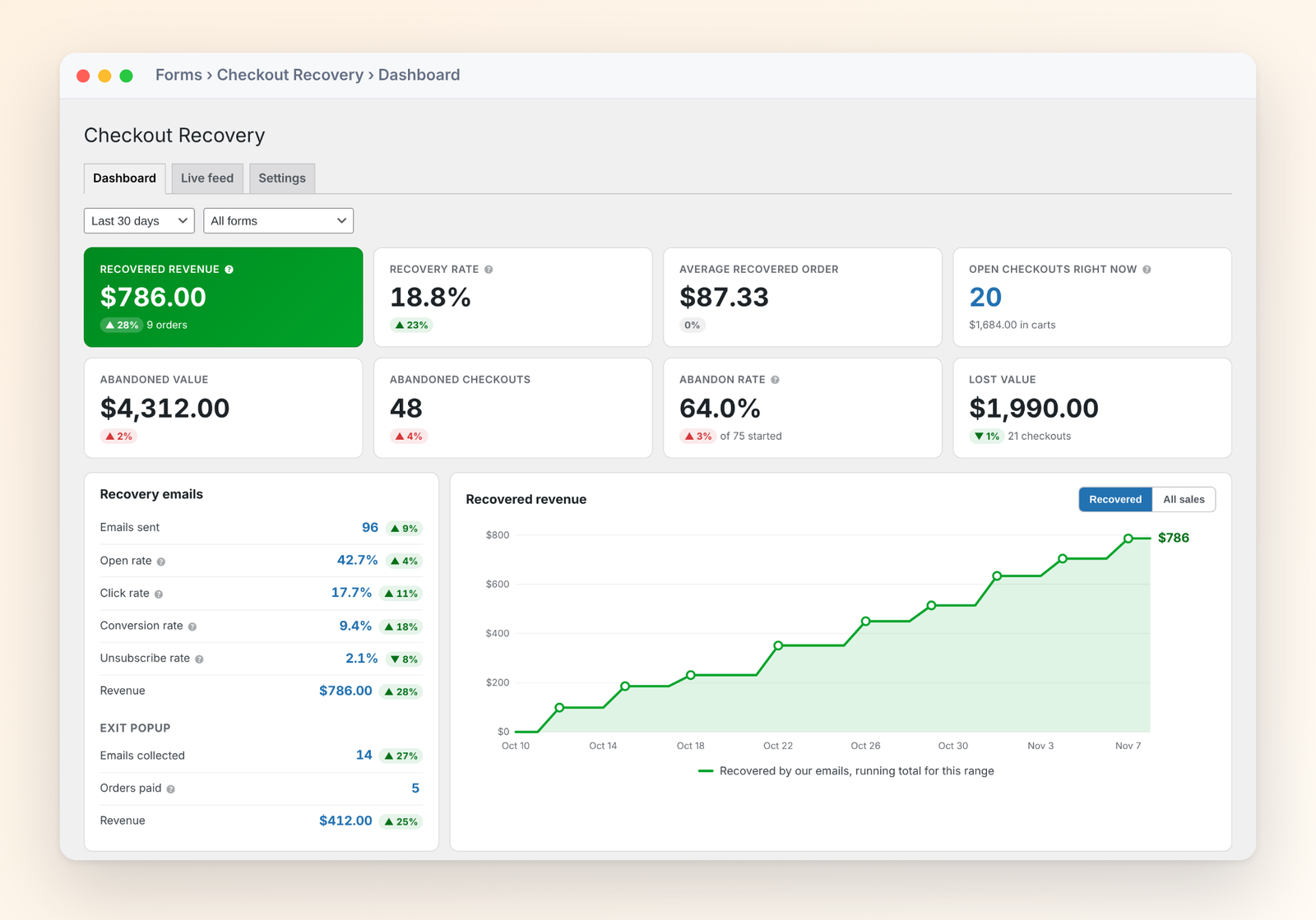
A payment within 7 days of a recovery email counts as Recovered. The dashboard shows the total, the recovery rate and which email did the work.
Features
Everything you need to win the sale back.
Finish my order links
A private link reopens the form with the shopper’s answers filled in, and on multi-page forms takes them back to the page they reached.
Live feed board
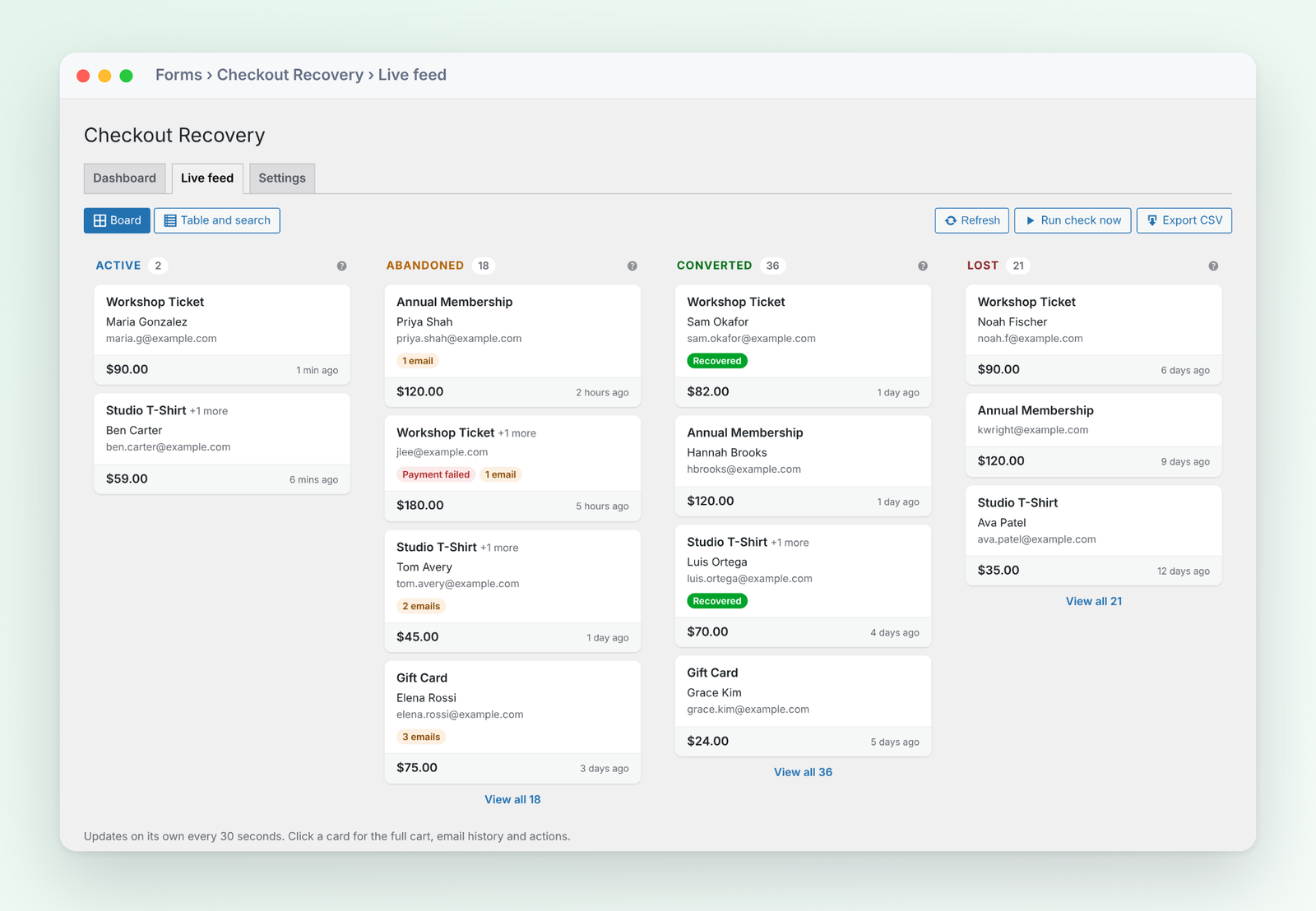
Every saved checkout as a card in Active, Abandoned, Converted or Lost. Open one to see its answers, emails and timeline, or export to CSV.
A dashboard in dollars
Recovered revenue, recovery rate and abandoned value, compared with the previous period, plus opens, clicks and recoveries for each email.
A ready-made email sequence
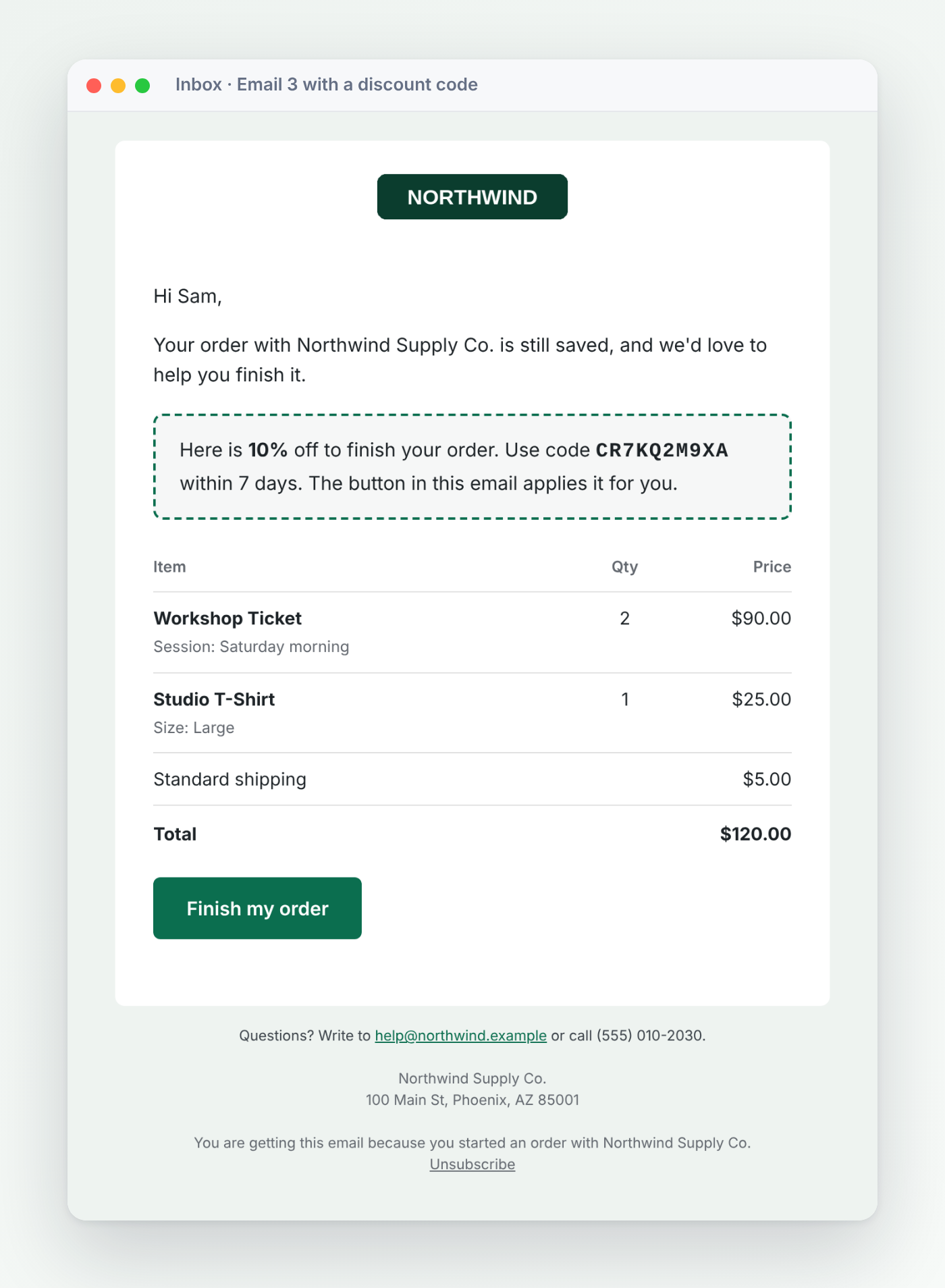
Three friendly emails, ready to go. Edit the delays, subjects, messages and buttons, and use merge tags for the name, order table and total.
Failed-payment email
When a card is declined, the first email says the payment didn’t go through and offers a Try again button. Declines are detected for the official Stripe add-on.
Single-use discount codes
Optional, and 10% off in Email 3 by default. Each code is made in the Gravity Forms Coupons add-on, works only on that form, expires after 7 days and is applied by the link.
Exit popup
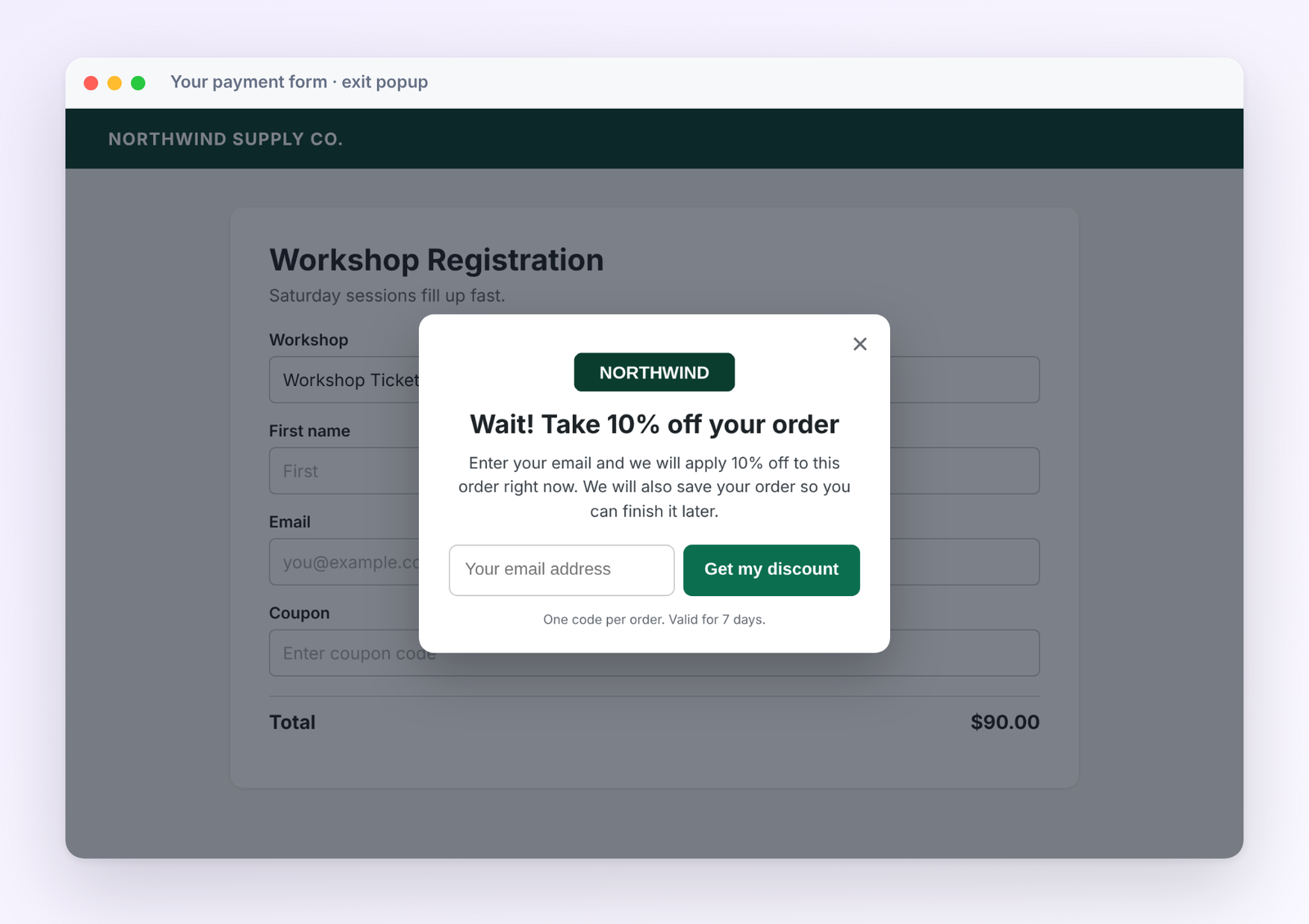
Shopper picked a product, typed no email and is heading out? Offer a code for their email. Exit intent on desktop, 30 idle seconds on phones, once per visitor every 7 days.
Your branding
Add your logo, button and link colors, header text and a footer line. Your business address and an unsubscribe link go on every email.
Minimum cart totals
Skip emails for small carts, or offer the discount only above a total you choose. Small carts are still saved and shown.
Test before going live
Send any email to yourself, and turn on Test mode to run the whole flow on your own checkouts. Test checkouts stay out of your stats.
Guided setup
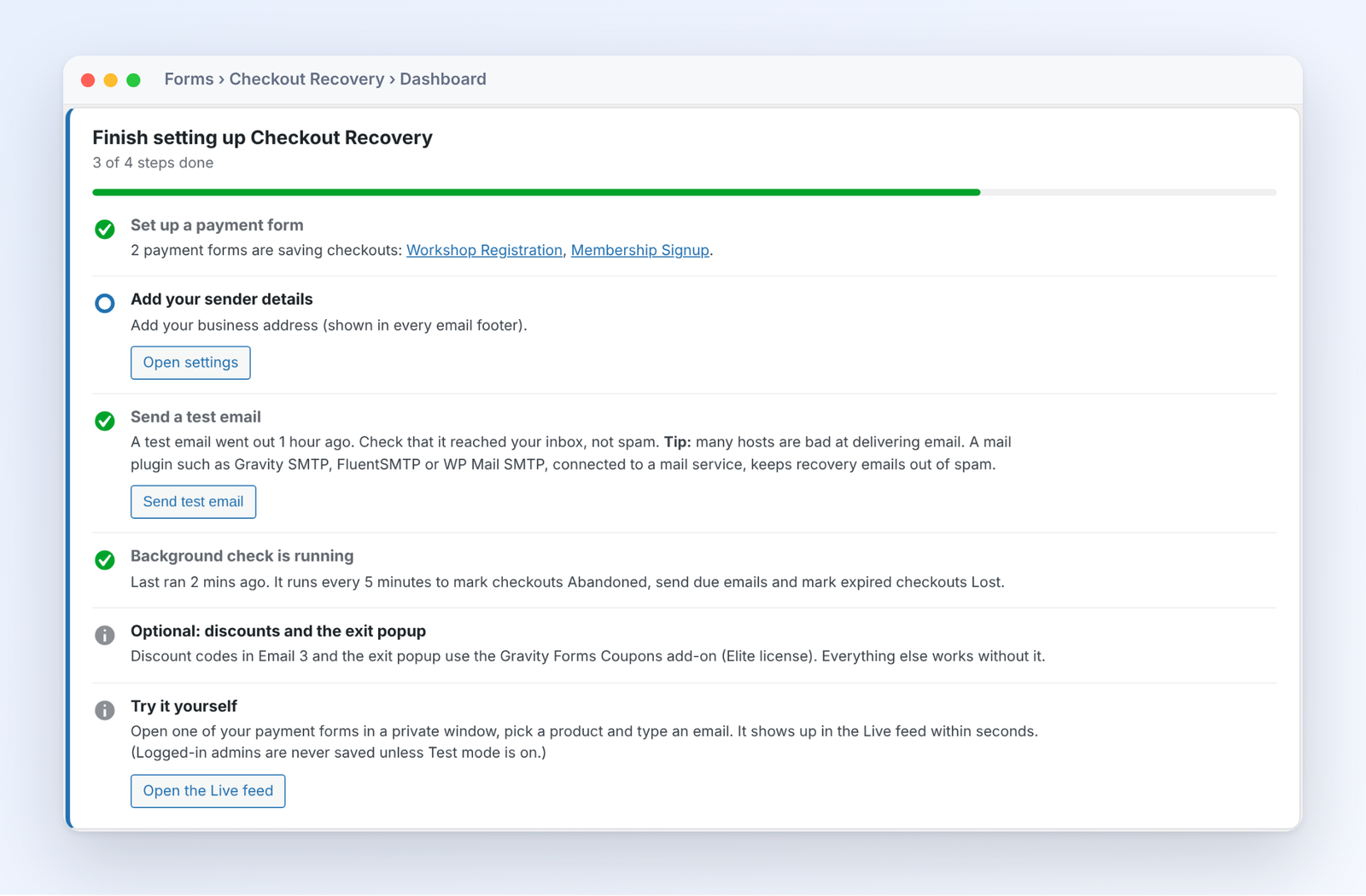
A checklist on the dashboard checks your payment forms, sender details, test email and background task, and tells you what’s left.
Plays well with caching
Saving a checkout doesn’t rely on a page nonce, so cached pages work. Background work uses Action Scheduler when it’s installed, or WP-Cron.
Honest numbers
It only takes credit it earned.
A payment counts as Recovered only when it comes within 7 days of a recovery email. Shoppers who come back and pay before any email are counted as Completed, and they never get a reminder. You can set the window anywhere from 1 to 90 days.
Paid within the window after a recovery email.
Came back and paid on their own, before any email.
No payment by the end of the window. Emails stop.
Privacy
Careful with your customers’ details.
- Card details are never saved. Neither are passwords, signatures, file uploads or CAPTCHA answers.
- Leave out any other field with “don’t save this field” in the form editor.
- Logged-in administrators are never saved, unless you turn on Test mode.
- Every email has an unsubscribe link and your business address. Unsubscribes are stored as a hash, not the address.
- Works with the WordPress personal data export and erase tools.
- Saved checkouts are deleted after 90 days, or the period you choose.
- An optional line under the email field tells shoppers their order is saved.
- Popup codes are limited per visitor each day, so nobody can collect a pile of discounts.
Setup
Runs on the payment forms you already have.
-
1
Install and activate
Your payment forms are found automatically: any form with Product fields, an active payment feed and an Email field.
-
2
Add your sender details
Enter a From email on your own domain and your business address, then send yourself a test email.
-
3
Follow the checklist
The dashboard checklist confirms each step, and your first saved checkout shows up in the Live feed within seconds.
Requirements
- Gravity Forms 2.7 or newer
- WordPress 6.0 or newer and PHP 7.4 or newer
- A Gravity Forms payment add-on, such as Stripe
- An SMTP plugin is recommended, such as Gravity SMTP, FluentSMTP or WP Mail SMTP
- Discount codes and the exit popup need the Gravity Forms Coupons add-on (Elite license) and a Coupon field on the form
Pricing
One plan, every site you run.
Every feature on this page is included, on as many sites as you like.
Checkout Recovery for Gravity Forms
$79.99 / year
- Use it on all of your sites
- Every feature included
- Updates and support for the year
- Gravity Forms 2.7 or newer
FAQ
Questions
Does it save credit card details?
No. Card fields are never read or saved, and neither are passwords, signatures, uploads or CAPTCHA answers. When a shopper comes back, they enter their card again.
Which payment add-ons does it work with?
Gravity Forms payment add-ons that use payment feeds, such as Stripe, PayPal Checkout and Square. The failed-payment email detects declines for the official Stripe add-on.
Do I need a Gravity Forms Elite license?
Only for discount codes and the exit popup, which use the Gravity Forms Coupons add-on. Saving checkouts, the emails, the Live feed and the dashboard work without it.
Will customers who already paid get a reminder?
No. Payments are matched to the saved checkout, and emails stop as soon as the shopper pays, unsubscribes or the checkout is marked Lost.
How are the emails sent?
Through WordPress’s own mail function, so Gravity SMTP, FluentSMTP, WP Mail SMTP or any mail plugin delivers them. We recommend using one, since many hosts are poor at delivering email.
Does it work with multi-page forms?
Yes. The Finish my order link refills every saved answer and takes the shopper back to the page they reached.
Does it work on forms without a payment?
Not yet. Checkout Recovery is built for forms that take a payment. Contact forms and other forms without a payment feed are left alone.
Can I try it without emailing real customers?
Yes. Send any email to yourself from the settings, and turn on Test mode to run the whole flow on your own checkouts. Test checkouts are marked Test and left out of your stats.
Do shoppers need an account?
No. Each checkout gets its own private Finish my order link.
Does it work with page caching?
Yes. Saving a checkout doesn’t depend on a nonce in the page, so cached pages work.
Win back your next abandoned order.
Install it on your payment forms today and watch the Live feed fill up.